How mouse roaming, 10Gbps USB sharing, and flexible control help streamline modern multi-system environments
As professional work environments become more digital, it is increasingly common for one operator to manage several computers at the same workstation. This can happen in IT administration, control rooms, testing laboratories, AV integration projects, and industrial monitoring environments. While computing power continues to improve, many workflow inefficiencies still come from a more basic issue: how users control multiple systems quickly and comfortably.
Using separate keyboards, mice, audio devices, and USB peripherals for each computer can make a workstation cluttered and difficult to manage. Manual switching between systems also slows down daily tasks and can interrupt concentration during time-sensitive operations. For these reasons, many organizations are looking for more streamlined ways to manage multi-system workflows.
One practical solution is a 4-port USB-C KM switch. By allowing multiple computers to share a single keyboard, mouse, and selected peripherals, this type of device can simplify cabling, reduce desktop clutter, and improve operational efficiency. In this article, we look at why multi-computer workstations are becoming more common, what challenges they create, and how a professional solution such as the Rextron USW-T334 can help support modern workflow requirements.
Why multi-computer workstations are becoming more common
In many professional settings, one computer is no longer enough to handle all operational tasks. Teams often work across multiple platforms, systems, or network environments at the same time. As a result, multi-computer workstations have become a practical necessity rather than a specialized setup.
For example, IT administrators may need to monitor several hosts simultaneously. Testing and validation teams often use different systems for cross-platform checks. Control room operators may supervise multiple machines tied to different functions, while AV and system integration professionals may need centralized access to several computers during setup and operation. In industrial or edge computing environments, multiple connected systems are also common for monitoring, control, and data processing.
The continued adoption of USB-C has further influenced workstation design. Compact PCs, modern laptops, and newer industrial systems increasingly rely on USB-C connectivity, making USB-C-based switching solutions more relevant in current professional environments.
Common workflow challenges in multi-system environments
Although multi-computer workstations provide flexibility, they can also create daily workflow challenges. The most obvious issue is hardware clutter. When each computer requires its own keyboard, mouse, and accessories, the desktop quickly becomes crowded. This not only affects comfort but also reduces productivity.
Another challenge is USB peripheral management. Reconnecting storage devices, accessories, or input tools between systems takes time and creates interruption. Audio management can also become inconvenient when multiple computers need to share speakers, headsets, or other devices.
In environments where users must move quickly between systems, switching inefficiency becomes more than a convenience problem. It can affect response time, concentration, and operational accuracy. A fragmented setup may be acceptable for casual use, but in professional environments, it often becomes a bottleneck.
What a USB-C KM switch does
A KM switch is designed to help multiple computers share a single keyboard and mouse setup. Depending on the product design, it may also support sharing of USB peripherals and audio devices. In practical terms, this allows users to operate several computers from one console instead of maintaining separate input devices for each machine.
This is slightly different from a full KVM switch. A KVM switch typically handles keyboard, video, and mouse switching together. A KM switch, by contrast, focuses on keyboard-and-mouse control and USB workflow efficiency. For environments where video switching is not the primary need, a KM switch can provide a more targeted and efficient solution.
The USB-C form factor is especially important today because it aligns with the connectivity standards used by many modern devices. It can help simplify cabling, support newer workstation layouts, and fit more naturally into professional setups that rely on USB-C hosts.
Why a 4-port design is useful for professional workstations

For many users, a 4-port design offers the right balance between scalability and simplicity. A two-port switch may be enough for basic dual-system use, but professional environments often involve more than two computers. A 4-port setup provides more room for workflow flexibility without becoming unnecessarily complex.
This configuration can fit a variety of use cases. A user may need one main workstation, one test system, one backup machine, and one monitoring host. In other cases, development teams may work across multiple operating systems, while control room operators may need access to several distinct systems within one desk environment.
Compared with larger matrix-style environments, a 4-port KM switch remains practical and manageable. It gives users access to multiple hosts while maintaining a clean and centralized console workflow.
Why mouse roaming and 10Gbps USB sharing matter
Not all switching solutions offer the same user experience. In professional environments, advanced functions such as mouse roaming and high-speed USB sharing can make a major difference.
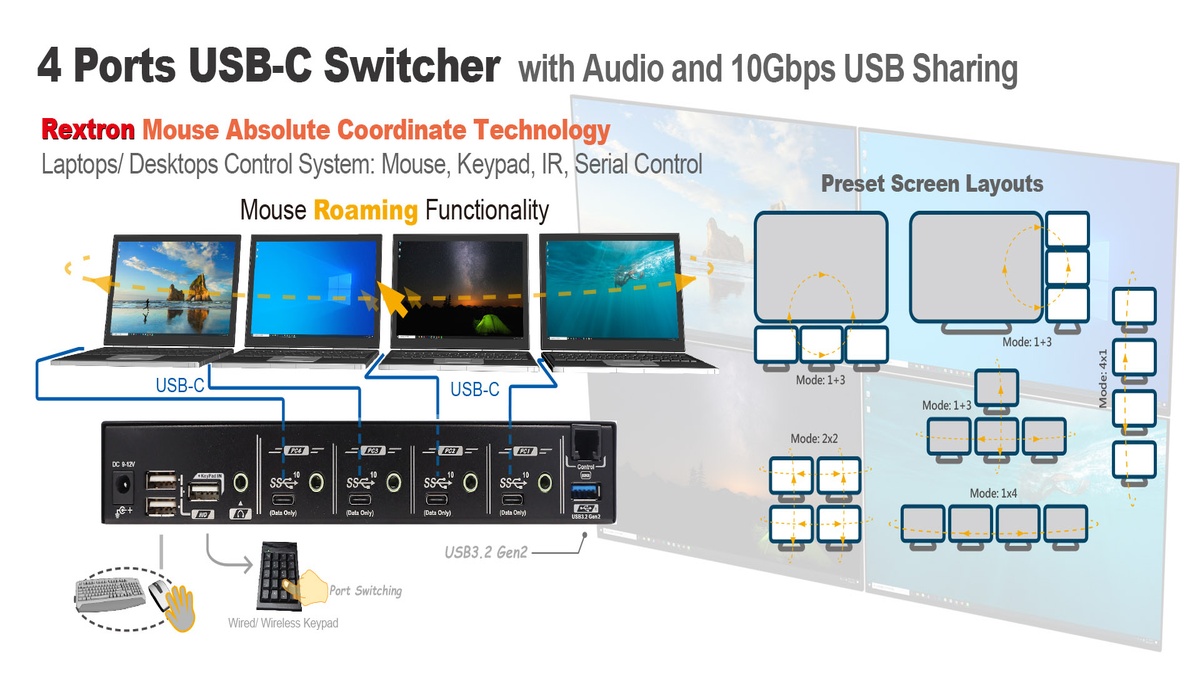
Mouse roaming allows users to move the cursor across screen boundaries and switch control between systems more intuitively. Instead of repeatedly pressing buttons or using a manual switching routine, users can operate multiple computers in a way that feels more fluid and natural. This can be especially valuable in multi-display environments where speed and ease of use matter.
High-speed USB sharing is also important. In many workstations, the shared devices are not limited to a basic keyboard and mouse. Users may need access to external storage, audio devices, specialized USB accessories, or other peripherals that benefit from higher bandwidth. A 10Gbps USB sharing capability better supports these more demanding workflows compared with lower-speed solutions.
Together, these features help transform a switch from a simple accessory into a more capable productivity tool for professional multi-system environments.
Flexible control and integration options for complex setups
Professional workstations often require more than one method of switching control. Different users and environments have different preferences, and some installations also require integration with external control systems.
For everyday desktop use, hotkeys can provide fast and convenient switching. Front-panel push buttons offer direct local control. Mouse-based switching adds intuitive operation in dynamic multi-screen environments. IR control can provide another layer of convenience, while serial control is especially valuable in professional integration scenarios where centralized system management is needed. In some applications, keypad input may also support more specialized operational workflows.
The value of multiple control methods is that they allow the same KM switching solution to work across office, technical, and integrated control environments. This flexibility is particularly important for system integrators and organizations deploying switching solutions across diverse use cases.
A practical example: Rextron USW-T334
One example of this kind of professional solution is the Rextron USW-T334. It is a 4-port USB 3.2 Gen 2 USB-C KM switch designed to help multiple USB-C computers share a single keyboard, mouse, audio path, and USB peripherals in a more organized way.
From a workflow perspective, the USW-T334 combines several functions that are useful in professional multi-computer environments. It supports four USB-C host connections, 10Gbps USB sharing, mouse roaming, and USB synchronization or broadcast functions. It also supports multiple switching methods, including hotkey control, mouse control, front push buttons, serial control, IR control, and keypad input.
These features make it relevant for a range of environments, including professional desks with multiple hosts, control and monitoring setups, validation or testing stations, and AV or system integration projects. Rather than functioning only as a basic desktop accessory, it is positioned as a more capable switching tool for structured and efficiency-focused workstations.
- 4-port USB-C host switching
- 10Gbps USB sharing
- Mouse roaming
- USB synchronization / broadcast support
- Hotkey, mouse, push button, serial, IR, and keypad control options
Application takeaway: For organizations that need to manage four USB-C systems from one operator position, a solution like the USW-T334 can help reduce desktop clutter, centralize peripheral access, and improve workflow continuity.
Final thoughts
As multi-computer workflows continue to expand, workstation efficiency depends not only on computing performance but also on how easily users can control multiple systems from a single operating position. A well-designed 4-port USB-C KM switch can help reduce clutter, simplify peripheral sharing, and support faster transitions between systems.
Features such as mouse roaming, 10Gbps USB sharing, and flexible control methods are becoming increasingly valuable in professional environments where responsiveness and ease of operation matter. For these use cases, solutions such as the Rextron USW-T334 demonstrate how KM switching can evolve from a simple utility product into a practical workflow enhancement tool.

(4059)(20260924)(原).jpg)
(2367)(20260924)(原).jpg)